UMLet - UML Tool for Fast UML Diagrams | Eclipse Plugins, Bundles and Products - Eclipse Marketplace
Very nice tool for simple UML diagramming, that I could then export to Word. I ran it as an Eclipse plug in, and would definitely use this again. There's almost no learning curve, the interface is simple. I thought of BoUML as a good tool, but this is even easier to use.
Wednesday, 17 August 2011

Thursday, 14 July 2011
Home Computing 101
After a recent IT disaster, the need to back up to more than one location has been driven home pretty brutally. After some work, and some help, I did manage to get back most of what I had before. The biggest loss has been the source code from previous jobs : some of that was quite neat, and always a useful reference.
So backups are back on a weekly schedule to alternating locations : this time one to an external hard drive on Sunday, and one from the primary computer to the server on a Saturday. I will need to organize the backups for the server's repository as well. Backups are through Genie 9's Genie Backup Manager Home 8.0. It's easy enough to use, but haven't tried restoring from it yet.
As part of the general effort to restore the PC, I decided to partition the C drive on the primary PC into 3 areas : C: for Windows and general family use, H: for development work and data, and I: which will eventually host Ubuntu. I use Ubuntu a bit at work, but it'd be useful to get more time with it.
This proved to a useful guide to partitioning a hard drive. From there I looked at SwissKnife, but in the end went for Easeus Partition Master Home Edition. I can't recommend it enough : easy to use, pretty quick, nice UI. If anyone knows any drawbacks on this tool, let me know, because at the moment, I'm sold.
So backups are back on a weekly schedule to alternating locations : this time one to an external hard drive on Sunday, and one from the primary computer to the server on a Saturday. I will need to organize the backups for the server's repository as well. Backups are through Genie 9's Genie Backup Manager Home 8.0. It's easy enough to use, but haven't tried restoring from it yet.
As part of the general effort to restore the PC, I decided to partition the C drive on the primary PC into 3 areas : C: for Windows and general family use, H: for development work and data, and I: which will eventually host Ubuntu. I use Ubuntu a bit at work, but it'd be useful to get more time with it.
This proved to a useful guide to partitioning a hard drive. From there I looked at SwissKnife, but in the end went for Easeus Partition Master Home Edition. I can't recommend it enough : easy to use, pretty quick, nice UI. If anyone knows any drawbacks on this tool, let me know, because at the moment, I'm sold.
Thursday, 5 May 2011
Tomcat 7 Windows Service memory management - a correction
In an earlier post, I made a serious mistake, so this should go some way to correcting it.
First Hudson Run
My first run of Hudson on Tomcat 7 led to the infamous error :
Using VisualVM, it shows the PermGen size to be still at the default 64MB size. Attempts to monitor the build process weren't successful as the entire machine ground to a halt.

Previously on Tomcat 5/6, I'd've set the catalina.bat or catalina.sh file to contain the memory management options, but this file doesn't exist in Tomcat 7. This was new to me.
Tomcat itself isn't helpful with Permgen, as although it's possible to find the inital and maximum heap memory size on the Manager App, Server Status tab, it doesn't show the permgen size.

There are some really good sites listing the mechanics of setting Tomcat's memory.
WEBMAP is for a Tomcat running on jdk 1.3, but the step by step process to figuring out which parameters are useful is useful.
CATALINA_OPTS vs JAVA_OPTs
I found some sites that suggested setting the OPTS as a Windows environment variable. Several blogs and sites suggest using JAVA_OPTS. I'd caution on this, as although others got it to work, JAVA_OPTS are used by other applications (JBoss in particular was mentioned), not just Tomcat. I decided to stick with CATALINA_OPTS.
But, when I tried setting the environment variable, and restarting Tomcat, I didn't see an increase in the Heap size. I'm not saying it doesn't work, but I couldn't get it to work. Combined with the fact that I didn't like the idea of doing it this way as it seems to be scattering the configuration across a number of places, I didn't really put any further effort into making this work.
Setting memory options on Tomcat
 Remember -Xms and -Xmx only set the heap size. These are easy enough to set through the Monitor Tomcat GUI, on the Java tab as the Initial Memory Pool (equivalent to -Xms) and the Maximum Memory Pool (-Xmx).
To set the Permgen size, you need either -XX:PermSize=XXXm or -XX:MaxPermSize=XXXm, and see WEBMAP for a more detailed review of each of these. Again, this can be set on the Java tab of the Monitor Tomcat GUI, this time as a Java Option, I went for -XX:PermSize=128m.
The difference can be seen on the next screenshot, again of the MonitorVM application. Heap size has gone from 67MB to 134MB.

Effect of all of this ?
I now have a Hudson build that doesn't crash Tomcat either during or immediately after each run. Heap size during a build is about the 75MB mark. Maybe now I can start doing some coding ...
Useful references
In addition to those mentioned above, I found these two references from http://www.skill-guru.com to be useful :
Setting Heap Size
Setting Permgen Size
First Hudson Run
My first run of Hudson on Tomcat 7 led to the infamous error :
FATAL: PermGen space java.lang.OutOfMemoryError: PermGen spaceNot surprising, given the spec of the machine I'm using, but still a pain.
Using VisualVM, it shows the PermGen size to be still at the default 64MB size. Attempts to monitor the build process weren't successful as the entire machine ground to a halt.

Previously on Tomcat 5/6, I'd've set the catalina.bat or catalina.sh file to contain the memory management options, but this file doesn't exist in Tomcat 7. This was new to me.
Tomcat itself isn't helpful with Permgen, as although it's possible to find the inital and maximum heap memory size on the Manager App, Server Status tab, it doesn't show the permgen size.

There are some really good sites listing the mechanics of setting Tomcat's memory.
WEBMAP is for a Tomcat running on jdk 1.3, but the step by step process to figuring out which parameters are useful is useful.
CATALINA_OPTS vs JAVA_OPTs
I found some sites that suggested setting the OPTS as a Windows environment variable. Several blogs and sites suggest using JAVA_OPTS. I'd caution on this, as although others got it to work, JAVA_OPTS are used by other applications (JBoss in particular was mentioned), not just Tomcat. I decided to stick with CATALINA_OPTS.
But, when I tried setting the environment variable, and restarting Tomcat, I didn't see an increase in the Heap size. I'm not saying it doesn't work, but I couldn't get it to work. Combined with the fact that I didn't like the idea of doing it this way as it seems to be scattering the configuration across a number of places, I didn't really put any further effort into making this work.
Setting memory options on Tomcat

To set the Permgen size, you need either -XX:PermSize=XXXm or -XX:MaxPermSize=XXXm, and see WEBMAP for a more detailed review of each of these. Again, this can be set on the Java tab of the Monitor Tomcat GUI, this time as a Java Option, I went for -XX:PermSize=128m.
The difference can be seen on the next screenshot, again of the MonitorVM application. Heap size has gone from 67MB to 134MB.

Effect of all of this ?
I now have a Hudson build that doesn't crash Tomcat either during or immediately after each run. Heap size during a build is about the 75MB mark. Maybe now I can start doing some coding ...
Useful references
In addition to those mentioned above, I found these two references from http://www.skill-guru.com to be useful :
Setting Heap Size
Setting Permgen Size
Tuesday, 19 April 2011
Solving Tomcat 7 memory problems.
Hudson builds
I started running Hudson builds again, looking for the cause of these out of memory errors.
The project builds, but then fails after each Maven project has built :
VisualVM
At this point, I'm not sure whats going on.
In an effort to diagnose, I installed Java's memory viewer, VisualVM. I've used it precursor before, when it was first bundled with early versions of Netbeans 6.
Installing is straightforward, but found that Tomcat didn't show up as a process running under the VM. When Tomcat runs as a service, even if it's running under the same user account that you used to launch VisualVM, Tomcat won't appear by default in the VisualVM process list. I found the answer here, at Matt Woodward's blog , which included the vital information about including
-Dcom.sun.management.jmxremote.port=8086
-Dcom.sun.management.jmxremote.ssl=false
-Dcom.sun.management.jmxremote.authenticate=false
in the Java Options box on the Java options tab.
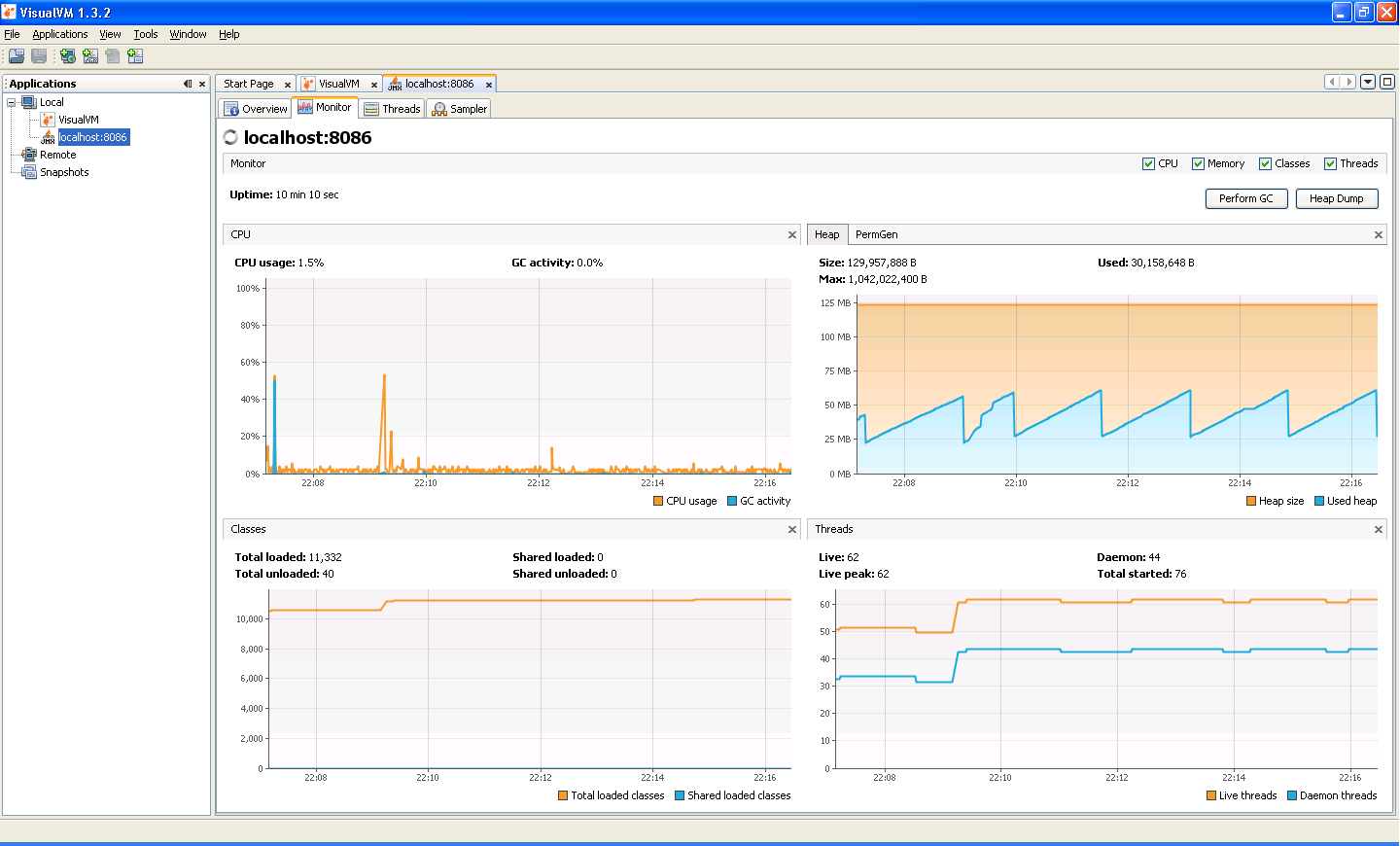
With the steps from that and a restart of Tomcat, I now have Tomcat 7 being monitored by VisualVM.
I started running Hudson builds again, looking for the cause of these out of memory errors.
The project builds, but then fails after each Maven project has built :
[INFO] ------------------------------------------------------------------------
[INFO] Reactor Summary:
[INFO]
[INFO] expiryTracker ..................................... SUCCESS [5.516s]
[INFO] model ............................................. SUCCESS [29.813s]
[INFO] API for expiry tracker ............................ SUCCESS [4.797s]
[INFO] maven-importer .................................... SUCCESS [3.500s]
[INFO] expirytracker-hib ................................. SUCCESS [3.343s]
[INFO] webapp Maven Webapp ............................... SUCCESS [4.453s]
[INFO] ------------------------------------------------------------------------
[INFO] BUILD SUCCESS
[INFO] ------------------------------------------------------------------------
[INFO] Total time: 58.266s
[INFO] Finished at: Tue Apr 19 21:21:22 BST 2011
[INFO] Final Memory: 20M/49M
[INFO] ------------------------------------------------------------------------
maven builder waiting
channel stopped
Archiving artifacts
Deploying artifacts to http://server:8082/archiva/repository/snapshots/
uniqueVersion == false is not anymore supported in maven 3
Deploying the main artifact pom.xml
FATAL: PermGen space
java.lang.OutOfMemoryError: PermGen space
 at sun.net.www.protocol.http.HttpURLConnection.getServerAuthentication(Unknown Source)
 at sun.net.www.protocol.http.HttpURLConnection.getInputStream(Unknown Source)
 at java.net.HttpURLConnection.getResponseCode(Unknown Source)
 at org.apache.maven.wagon.providers.http.LightweightHttpWagon.finishPutTransfer(LightweightHttpWagon.java:185)
 at org.apache.maven.wagon.AbstractWagon.putTransfer(AbstractWagon.java:413)
 at org.apache.maven.wagon.AbstractWagon.transfer(AbstractWagon.java:392)
 at org.apache.maven.wagon.AbstractWagon.putTransfer(AbstractWagon.java:365)
 at org.apache.maven.wagon.StreamWagon.put(StreamWagon.java:163)
 at org.apache.maven.repository.legacy.DefaultWagonManager.putRemoteFile(DefaultWagonManager.java:543)
 at org.apache.maven.repository.legacy.DefaultWagonManager.putArtifact(DefaultWagonManager.java:494)
 at hudson.maven.artifact.deployer.DefaultArtifactDeployer.deploy(DefaultArtifactDeployer.java:160)
 at hudson.maven.reporters.MavenArtifactRecord.deployMavenArtifact(MavenArtifactRecord.java:139)
 at hudson.maven.reporters.MavenArtifactRecord.deploy(MavenArtifactRecord.java:126)
 at hudson.maven.RedeployPublisher.perform(RedeployPublisher.java:128)
 at hudson.tasks.BuildStepMonitor$1.perform(BuildStepMonitor.java:19)
 at hudson.model.AbstractBuild$AbstractRunner.perform(AbstractBuild.java:622)
 at hudson.model.AbstractBuild$AbstractRunner.performAllBuildSteps(AbstractBuild.java:601)
 at hudson.maven.MavenModuleSetBuild$RunnerImpl.post2(MavenModuleSetBuild.java:762)
 at hudson.model.AbstractBuild$AbstractRunner.post(AbstractBuild.java:548)
 at hudson.model.Run.run(Run.java:1386)
 at hudson.maven.MavenModuleSetBuild.run(MavenModuleSetBuild.java:405)
 at hudson.model.ResourceController.execute(ResourceController.java:88)
 at hudson.model.Executor.run(Executor.java:145)
VisualVM
At this point, I'm not sure whats going on.
In an effort to diagnose, I installed Java's memory viewer, VisualVM. I've used it precursor before, when it was first bundled with early versions of Netbeans 6.
Installing is straightforward, but found that Tomcat didn't show up as a process running under the VM. When Tomcat runs as a service, even if it's running under the same user account that you used to launch VisualVM, Tomcat won't appear by default in the VisualVM process list. I found the answer here, at Matt Woodward's blog , which included the vital information about including
-Dcom.sun.management.jmxremote.port=8086
-Dcom.sun.management.jmxremote.ssl=false
-Dcom.sun.management.jmxremote.authenticate=false
in the Java Options box on the Java options tab.
With the steps from that and a restart of Tomcat, I now have Tomcat 7 being monitored by VisualVM.
Friday, 1 April 2011
Rush just about over
In the last month, I've now racked up about 60+ hours overtime. Combined with time in lieu from last year, that makes it about 10 days time in lieu I'm owed. Sweet.
And next week, can get back to my own project.
And next week, can get back to my own project.
Subscribe to:
Posts (Atom)